In the rapidly evolving landscape of web development, the demand for faster, more efficient, and pixel-perfect website creation has never been higher. Traditional methods of converting design mockups into functional code often involve manual, time-consuming processes prone to errors and delays. This is where DesignToCodeAI steps in, offering a groundbreaking solution that leverages advanced artificial intelligence to transform any design image or website URL into production-ready HTML or Elementor templates in minutes. As of May 2026, this technology is redefining how designers and developers approach their workflows, promising unprecedented speed, accuracy, and creative freedom.
Table of Contents
- Introduction: The Dawn of AI-Powered Web Development
- What is DesignToCodeAI? Your Ultimate AI Co-Developer
- How DesignToCodeAI’s Multi-Agent AI System Works
- Unlocking Pixel-Perfect Output: HTML, Tailwind CSS, and JavaScript
- Streamlining WordPress Development with Elementor Template JSON
- Beyond Images: Website URL Conversion and AI Redesign Capabilities
- Addressing Common Design-to-Code Challenges with AI
- Who Benefits Most from DesignToCodeAI?
- Transparent and Flexible: Understanding DesignToCodeAI’s Pricing
- Addressing Key Concerns: SEO, Security, and Data Privacy
- The Future of Web Creation: DesignToCodeAI’s Vision
- Conclusion: Transform Your Workflow with DesignToCodeAI
Introduction: The Dawn of AI-Powered Web Development
The digital world demands constant innovation, pushing web developers and designers to deliver high-quality, responsive websites at an ever-increasing pace. The traditional design-to-code workflow, often a bottleneck, is now being revolutionized by artificial intelligence. This shift promises to automate repetitive tasks, allowing creative professionals to focus on strategic design and complex problem-solving rather than mundane coding.
Transforming Design Concepts into Production-Ready Code
DesignToCodeAI represents a significant leap forward in web development automation. It enables the conversion of visual designs from various sources—be it an image, a screenshot, a Figma link, or even an existing website URL—into functional, production-ready code. This capability dramatically shortens the development cycle, moving from concept to launch with unprecedented speed.
Why Traditional Design-to-Code Methods Fall Short
Manually translating design mockups into code is inherently labor-intensive and prone to human error. Developers spend countless hours meticulously crafting HTML, CSS, and JavaScript, often battling inconsistencies between design tools and browser renderings. This process can lead to significant delays, increased costs, and a disconnect between the designer’s vision and the final product. The quest for pixel-perfect execution often becomes a tedious, repetitive task that detracts from higher-value creative work.
The Evolution of AI in Web Design
The integration of AI into creative industries, particularly web design and development, is a major trend as of May 2026. Initially, AI tools focused on basic automation or content generation. However, the field has rapidly advanced, with generative AI and computer vision models now capable of understanding complex visual layouts and translating them into structured, functional code. This evolution marks a shift from simple task automation to intelligent co-creation, where AI acts as a powerful assistant, augmenting human capabilities rather than replacing them.
What is DesignToCodeAI? Your Ultimate AI Co-Developer
DesignToCodeAI is an advanced AI-powered platform designed to convert any visual design input into clean, semantic HTML with optimized Tailwind CSS and JavaScript, or a ready-to-import Elementor Template JSON file. It acts as a bridge between design and development, automating the most challenging and time-consuming aspects of frontend coding. Far more than a simple converter, it functions as an intelligent co-developer, translating creative vision into technical reality.
Defining AI-Powered Design Conversion
AI-powered design conversion involves using sophisticated artificial intelligence algorithms to analyze a visual design and automatically generate corresponding code. DesignToCodeAI’s multi-agent AI system meticulously interprets layout, typography, colors, and components, translating these design elements into structured, functional web code. This process leverages deep learning models to understand visual context and relationships, ensuring a high degree of fidelity to the original design.
The Core Promise: Speed, Precision, and Flexibility
The central value proposition of DesignToCodeAI is its ability to deliver speed without sacrificing precision. It promises pixel-perfect accuracy in its conversions, ensuring the generated code faithfully replicates the original design. Furthermore, its flexible output options—HTML/CSS/JS or Elementor JSON—cater to a wide range of development environments and user preferences, from custom development to WordPress-based sites. This flexibility makes it a versatile tool for diverse project requirements.
Beyond Static Converters: The Dynamic Edge of DesignToCodeAI
Unlike basic image-to-HTML converters that often produce rigid, non-semantic, or difficult-to-maintain code, DesignToCodeAI’s multi-agent system intelligently interprets context and structure. Many older tools or simple low-code platforms might offer drag-and-drop interfaces but often lack the ability to truly understand a design’s intent or generate clean, semantic code that is production-ready. DesignToCodeAI stands apart by using advanced AI to generate dynamic, intelligent, and maintainable output, offering superior accuracy and a more robust foundation for further development compared to rule-based or less sophisticated conversion methods.
How DesignToCodeAI’s Multi-Agent AI System Works
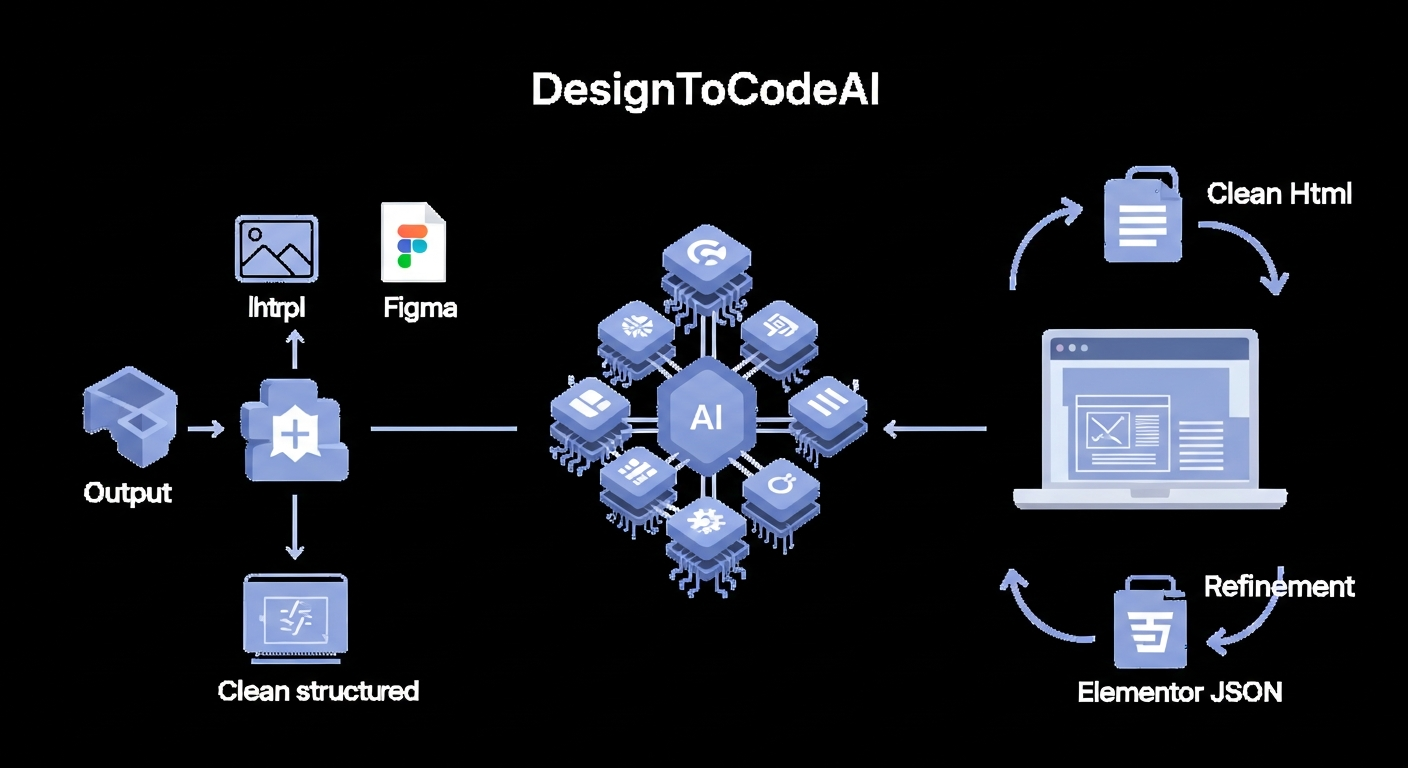
At the heart of DesignToCodeAI’s capabilities lies its sophisticated multi-agent AI system. This system comprises specialized AI agents that collaborate to manage every step of the conversion process, ensuring precision and speed from input to output. This architecture allows for a more nuanced understanding and accurate translation of complex visual designs.
Behind the Scenes: DesignToCodeAI’s AI Architecture
DesignToCodeAI employs a collaborative network of AI agents, each specializing in a distinct phase of the design-to-code process:
- Perception Agent: Utilizes advanced computer vision algorithms to analyze the input design. It identifies distinct UI components (buttons, text blocks, images, navigation bars), their spatial relationships, typography, color schemes, and overall layout. This agent excels at semantic understanding of design elements.
- Reasoning Agent: Interprets the structural intent of the design. It determines the optimal HTML hierarchy, identifies reusable components, and plans the responsive breakpoints. This agent acts as the ‘architect’ of the codebase.
- Generation Agent: Employs generative AI models to synthesize the actual code. Based on the reasoning agent’s plan, it outputs clean, semantic HTML, optimized Tailwind CSS, and relevant JavaScript.
- Refinement Agent: Conducts iterative improvements. It compares the generated code’s visual output against the original design, identifies discrepancies, and directs the generation agent to make adjustments, striving for pixel-perfect accuracy. This agent also processes user feedback and additional instructions.
Step 1: Seamless Design Input and Format Selection
The process begins with users uploading their design source. This can be a simple drag-and-drop of a PNG or JPG image/screenshot (up to 20MB), pasting a Figma link, or entering a website URL for analysis. Users then select their desired output format: either production-ready HTML with Tailwind CSS and JavaScript or an Elementor Template JSON file. Preferences such as AI iteration count can also be customized at this stage, allowing users to control the depth of AI refinement.
Step 2: Intelligent AI Analysis and Conversion Process
Once the design is submitted, DesignToCodeAI’s multi-agent AI system springs into action. These specialized agents collaborate to:
- Analyze Layout: Identify structural elements like headers, footers, sections, and grids with high precision.
- Interpret Styling: Extract typography, color palettes, spacing, and component styles, ensuring visual consistency.
- Generate Code: Translate the visual information into semantic HTML, optimized Tailwind CSS, and relevant JavaScript, focusing on efficiency and maintainability.
- Redesign Option: For website URLs, a “Redesign” option allows the AI to generate a completely modern, fresh layout based on the content and structure of the original site, providing a contemporary aesthetic overhaul.
Step 3: Refinement, Iteration, and Export for Production
After the initial generation, users can review the code in a live preview engine. If further adjustments are needed, they can utilize AI iterations or a chat interface to guide the AI towards better output. This iterative feedback loop is crucial for achieving pixel-perfect results on complex designs. Once satisfied, the clean, production-ready HTML or Elementor Template JSON can be copied or downloaded directly. Neither uploaded designs nor generated code are stored on DesignToCodeAI’s servers, ensuring user privacy and data security.
Expert Insight: Experienced developers often leverage the AI iteration feature to fine-tune complex design elements, treating the AI as an intelligent assistant that handles the boilerplate code. This allows them to focus on unique functionalities, advanced styling adjustments, and custom JavaScript integrations, significantly accelerating the development phase.
Unlocking Pixel-Perfect Output: HTML, Tailwind CSS, and JavaScript
A core strength of DesignToCodeAI lies in its commitment to generating code that is not just functional, but also pixel-perfect, responsive, and optimized for modern web standards. This ensures that the aesthetic integrity of the original design is preserved in the final coded product.
Generating Clean, Semantic HTML Structure
DesignToCodeAI produces clean, semantic HTML, meaning the code uses appropriate tags (e.g., <header>, <nav>, <main>, <article>, <aside>, <section>, <footer>) to convey meaning and structure rather than just presentation. This improves accessibility for users with assistive technologies, enhances maintainability for developers, and significantly boosts search engine understanding of the content, which is foundational for robust and future-proof websites. The AI’s ability to discern logical content blocks and assign appropriate semantic tags is a hallmark of its advanced reasoning capabilities.
Optimized Tailwind CSS for Modern Styling
For styling, the platform utilizes Tailwind CSS, a utility-first CSS framework. This choice results in highly optimized, lightweight CSS by only including the styles actually used in the design. Tailwind CSS also promotes consistency and accelerates development by providing a standardized set of utility classes, making the generated code easy to understand and extend for developers. The AI intelligently applies these utility classes, ensuring that the generated styling is both precise and efficient, minimizing redundant CSS and enhancing page load times. This approach is a significant advantage over traditional CSS methodologies that often lead to bloated stylesheets.
Integrated JavaScript for Dynamic Functionality
Beyond static layouts, DesignToCodeAI can also incorporate basic dynamic functionalities via JavaScript. This means elements like interactive menus, carousels, accordions, tabbed content sections, simple form validations, and even subtle scroll-based animations can be part of the generated output. The AI generates clean, vanilla JavaScript (or integrates with lightweight libraries where appropriate) to bring these design elements to life without extensive manual coding. This capability is crucial for creating engaging user experiences directly from design inputs.
Ensuring Responsive Design Across All Devices
The AI system is engineered to generate responsive layouts automatically. It uses modern CSS techniques like flexbox and grid to ensure that the converted design adapts seamlessly to various screen sizes, from desktops to tablets and mobile phones. This is a critical feature in today’s multi-device digital landscape, where user experience dictates success. DesignToCodeAI ensures that the generated code includes the necessary media queries and fluid layouts, providing an optimal viewing experience regardless of the device used by the end-user.
Streamlining WordPress Development with Elementor Template JSON
For the vast community of WordPress users and developers, DesignToCodeAI offers a specialized output format: Elementor Template JSON. This feature significantly bridges the gap between custom design and the world’s most popular page builder, making complex designs accessible within a familiar environment.
Converting Designs Directly to Elementor-Ready Files
DesignToCodeAI can generate a single JSON file that is ready to be imported directly into Elementor via its Template Import option. This means a design created in Figma, Adobe XD, Sketch, or as a simple image can be transformed into an editable Elementor template, preserving all styling and layout. This eliminates the need for manual recreation of designs within Elementor, saving countless hours and ensuring design fidelity. WordPress developers can now take a client’s visual concept and have it ready for content population in a fraction of the time.
Seamless Import and Editing within Elementor
Once imported, the generated Elementor template behaves like any other Elementor template. Users can then easily customize text, images, and other elements using Elementor’s intuitive drag-and-drop interface. This provides full control over the final content while retaining the AI-generated structure and styling. The seamless integration means developers can leverage the power of AI for initial setup and then utilize Elementor’s robust editing capabilities for further customization and content management.
Best Practices for Multi-Section Elementor Conversions
For complex, multi-section designs, DesignToCodeAI recommends converting each major section separately. This approach improves AI accuracy in widget mapping and results in cleaner, more manageable Elementor JSON files. It also offers greater flexibility for editing individual sections within Elementor, avoiding the complexity of a single, monolithic JSON file that might be difficult to navigate or modify. This strategy ensures optimal performance and ease of use within the Elementor environment.
Beyond Images: Website URL Conversion and AI Redesign Capabilities
DesignToCodeAI’s versatility extends beyond static images, offering powerful capabilities for analyzing and transforming existing websites. This feature is particularly valuable for businesses looking to modernize their online presence without a complete rebuild.
Turning Existing Websites into Fresh, Modern Layouts
One of the standout features is the ability to input a website URL. The AI analyzes the existing site’s structure, content, and components, then generates a completely fresh, modern redesign. This is invaluable for businesses with outdated blogs, legacy e-commerce sites, or small business websites that need a contemporary aesthetic and improved user experience without the prohibitive cost and time of a traditional ground-up redesign. The AI intelligently preserves core content while applying modern design principles and responsive layouts.
Leveraging URLs for Design Inspiration and Overhauls
Designers can also use URLs simply for inspiration. By feeding a URL into DesignToCodeAI, they can generate a base layout that captures the essence or specific elements of a reference site, which can then be refined. This significantly reduces the initial setup time for new projects and helps explore diverse design concepts quickly. It’s a powerful tool for visual research and for rapidly iterating on design ideas by drawing from a vast pool of existing web designs.
The Power of AI for Rapid Prototyping and Iteration
The ability to convert designs from images or URLs so rapidly makes DesignToCodeAI an indispensable tool for rapid prototyping. Product managers and design teams can quickly generate multiple design variations, test concepts, and iterate on feedback without significant development overhead. This accelerates the design thinking process, allowing for more experimentation and innovation. For instance, a startup can generate several versions of a landing page in hours, test them, and deploy the most effective one, dramatically shortening the path to market validation.
Addressing Common Design-to-Code Challenges with AI
Manual design-to-code conversion is fraught with challenges that DesignToCodeAI is specifically engineered to mitigate. By automating and intelligentizing the process, many traditional pain points are effectively eliminated or significantly reduced.
Responsiveness and Cross-Browser Compatibility
Ensuring a website looks and functions perfectly across all devices and browsers is a major hurdle in manual development. Developers often spend significant time debugging layout issues on different screen sizes or browser engines. DesignToCodeAI, through its intelligent application of modern CSS frameworks like Tailwind CSS and its focus on semantic HTML, inherently generates responsive layouts that are highly compatible across various platforms, significantly reducing testing and adjustment time.
Code Maintenance and Scalability
Hand-coded projects can quickly become unwieldy, especially with large teams or long lifespans. Inconsistent coding styles, spaghetti code, and lack of modularity can make updates and scaling a nightmare. DesignToCodeAI generates clean, structured, and modular code by design. This inherent organization makes the output highly maintainable and scalable, allowing for easier future modifications and expansions without introducing technical debt.
Bridging the Design-Developer Handoff Gap
The handoff between design and development teams is often a source of friction, leading to misinterpretations, rework, and delays. Designers create pixel-perfect mockups, but developers struggle to translate every nuance into code accurately. DesignToCodeAI acts as a perfect intermediary, ensuring that the AI-generated code is a faithful representation of the design intent, thus minimizing discrepancies and streamlining communication. This creates a smoother, more efficient workflow for the entire team.
Who Benefits Most from DesignToCodeAI?
DesignToCodeAI is engineered to serve a diverse range of professionals in the digital creative space, fundamentally changing how they work and deliver projects.
Freelance Designers: Accelerating Project Delivery
Freelance designers often juggle multiple projects and tight deadlines. DesignToCodeAI significantly reduces their development time, allowing them to deliver projects faster and take on more clients. Imagine Sarah, a freelance lead designer, who receives a complex client mockup for a new landing page. Instead of spending two days meticulously hand-coding the responsive layout, she uploads the design to DesignToCodeAI, and within minutes, has a pixel-perfect HTML/Tailwind CSS base. She then refines it with a few AI iterations, delivering the frontend to her client in record time, freeing her to take on more projects and boost her income. Sarah notes, “The AI’s understanding of various design systems is truly impressive!”
WordPress Developers: Enhancing Efficiency with Elementor
WordPress developers, especially those using Elementor, can drastically cut down the time spent translating visual designs into Elementor templates. Consider Michael, a WordPress developer for a small agency. A client provides a Figma design for a custom service section. Traditionally, Michael would spend hours recreating this in Elementor, pixel by pixel. With DesignToCodeAI, he uploads the Figma design, generates an Elementor Template JSON, and imports it. “The Elementor Template JSON export is flawless. I can take a Figma design and have it live on a WordPress site in under 10 minutes now,” Michael shares. This efficiency gain is crucial for agencies and individual developers alike, allowing them to focus on custom functionalities and client-specific integrations.
Product Managers & Startups: Boosting Iteration Speed
For startups and product managers, rapid iteration is key to success. DesignToCodeAI provides amazingly accurate conversions that can be used for rapid prototyping. Emma, a Product Manager at a fast-growing startup, needs to test five different UI variations for a new feature. Manually coding these would take weeks. Using DesignToCodeAI, her team uploads the mockups, generates the code, and has functional prototypes ready for A/B testing within a day. This boosts iteration speed, allowing teams to test ideas, gather feedback, and launch minimum viable products (MVPs) much faster than with traditional development cycles, as Emma experienced, saying, “Amazingly accurate conversions. We use it for rapid prototyping and it has significantly boosted our iteration speed.”
Agencies and Creative Teams: Scaling Production Workflows
Agencies and larger creative teams can leverage DesignToCodeAI to scale their production workflows. By automating the design-to-code process, they can handle a higher volume of projects, maintain consistency across outputs, and free up their skilled developers for more complex, bespoke coding tasks. This translates to higher output, reduced operational costs, and improved client satisfaction. An agency can now take on more clients, deliver projects faster, and allocate its most valuable human resources to innovative problem-solving, rather than repetitive coding tasks.
Transparent and Flexible: Understanding DesignToCodeAI’s Pricing
DesignToCodeAI operates on a flexible, transparent points-based system, designed to ensure users pay only for what they use, without the burden of subscriptions or hidden fees. This model empowers users to manage their budget effectively based on their actual usage.
The Points-Based System Explained
Each design conversion, or generation, consumes a certain number of “Power Points.” The cost per generation typically ranges from 300 to 500 Points, depending on factors like the complexity of the design and the number of AI iterations selected for refinement. New users are welcomed with 500 free points upon signup, providing an excellent opportunity to experience the platform risk-free. This system allows for precise control over spending, making it suitable for varying project sizes and needs, from a single freelance project to ongoing agency work.
Cost-Effectiveness Compared to Manual Development
When compared to the time and labor costs of manual coding, DesignToCodeAI’s points-based system offers significant cost-effectiveness. The ability to convert complex designs into production-ready code in minutes, rather than hours or days, translates directly into reduced development expenditures and faster project completion, maximizing ROI for businesses and freelancers. According to industry standards, developer salaries can range significantly, making any tool that reduces manual coding time a substantial financial asset.
Choosing the Right Pack: Starter, Pro, and Power Options
DesignToCodeAI offers several Power Point Packs to suit different usage levels:
| Pack Name | Price | Power Points | Approx. Conversions | Key Features |
|---|---|---|---|---|
| Starter Pack | $12.00 | 1500 | ~15 | HTML/CSS/JS + Elementor JSON, Website URL support, Redesign functionality, Priority email support |
| Pro Pack (Most Popular) | $27.00 | 4000 | ~40 | All Starter features, increased points |
| Power Pack | $59.00 | 16000 | ~160 | All Pro features, significantly more points, Priority email/chat support |
Users can select the pack that best aligns with their anticipated conversion volume, ensuring they have enough points for their projects without overspending on unused subscriptions. More details are available on the DesignToCodeAI Pricing page, where you can find the most current offerings and make an informed decision.
Addressing Key Concerns: SEO, Security, and Data Privacy
In modern web development, beyond speed and accuracy, factors like search engine optimization, data security, and the overall production-readiness of the code are paramount. DesignToCodeAI addresses these concerns proactively, building trust and ensuring peace of mind for its users.
How DesignToCodeAI Ensures SEO-Friendly Code
DesignToCodeAI generates code that is inherently SEO-friendly. By producing semantic HTML, it provides search engines with a clear, structured understanding of the content. This foundational SEO practice, combined with responsive layouts that perform well on all devices, contributes positively to search engine rankings. A well-structured, fast-loading, and responsive website is a cornerstone of modern SEO practice. The AI ensures proper heading hierarchies, descriptive alt attributes (when applicable to input images), and clean markup, all vital for optimal search visibility.
Data Security and Privacy: What Happens to Your Designs?
Data privacy is a top priority for DesignToCodeAI. Neither uploaded designs nor generated code are stored on the platform’s servers. Your data is processed temporarily during your session and then discarded immediately upon completion or session end. This ensures that sensitive design assets and proprietary code remain confidential, adhering to a zero-retention policy for user-submitted content. This commitment to privacy is crucial in an era where data security is a primary concern for creative professionals and businesses.
Ensuring Production-Readiness and Minimizing Adjustments
While DesignToCodeAI aims for pixel-perfect, production-ready output, complex designs may occasionally require minor adjustments. The platform provides robust tools like AI iterations and additional instructions to guide the AI toward better results. This collaborative approach means that the initial AI output serves as a high-quality foundation, drastically reducing the need for extensive manual refinement and ensuring the final code meets professional standards. Users are empowered to fine-tune the AI’s output, ensuring it aligns perfectly with their specific project requirements.
Common Pitfall: A common mistake businesses and designers make is uploading overly complex, multi-layered designs as a single image and expecting perfect, one-shot conversion without any iteration. For optimal results, simplify your design inputs, provide clear visual hierarchy, and consider converting larger designs section-by-section, especially when generating Elementor templates. This approach maximizes AI accuracy and yields cleaner, more manageable code.
The Future of Web Creation: DesignToCodeAI’s Vision
The journey of web development is one of continuous evolution, and DesignToCodeAI is committed to staying at the forefront of this transformation, empowering a new generation of digital creators and shaping the future of frontend development.
Continuous Innovation: Insights from the Changelog
DesignToCodeAI is a platform under constant development, with regular updates and new features. The changelog provides a transparent look into the platform’s evolution, showcasing enhancements like expanded website URL input processing (version 1.6.4), improved AI pipelines for more accurate output, and advanced preview engines. These updates reflect a commitment to refining the AI’s capabilities and responding to user needs, ensuring the tool remains cutting-edge in the fast-paced AI landscape. This iterative improvement process guarantees that DesignToCodeAI consistently delivers increasing value and sophistication.
Empowering a New Generation of Digital Creators
By automating the code generation process, DesignToCodeAI empowers designers, developers, and entrepreneurs to focus on creativity, strategy, and user experience. It democratizes access to high-quality web development, allowing individuals and teams to bring their ideas to life with unprecedented speed and efficiency. This tool isn’t just about converting designs; it’s about transforming ideas into digital realities, aligning with the broader mission of ShahiSoft to empower businesses with cutting-edge AI solutions and tools like AIRAG SEO Agent and OmniscribeAI.
Future Outlook: The Expanding Role of AI in Frontend Development
Looking ahead, the role of AI in frontend development is set to expand dramatically. DesignToCodeAI envisions future integrations with popular design systems, allowing for component-based code generation that aligns with established brand guidelines. Further advancements in generative AI could lead to more sophisticated interactive elements, deeper content understanding for even more intelligent redesigns, and perhaps even AI-driven A/B testing suggestions. The platform is continuously exploring new ways to integrate advanced intelligence, making web creation more intuitive, efficient, and powerful. The goal is to move towards a more seamless, intelligent partnership between human creativity and AI-driven execution.
Conclusion: Transform Your Workflow with DesignToCodeAI
DesignToCodeAI stands as a pivotal tool for anyone involved in web development and design. By harnessing the power of a multi-agent AI system, it delivers pixel-perfect HTML, optimized Tailwind CSS, and seamless Elementor Template JSON conversions from various design inputs, including images and website URLs. It significantly accelerates workflows, reduces development costs, and ensures responsive, SEO-friendly output, making it an indispensable asset for freelancers, agencies, and product teams alike. Embrace the future of web creation and experience the efficiency that DesignToCodeAI brings to your projects.
Ready to revolutionize your web development process? Explore the full capabilities of DesignToCodeAI and start converting your designs into code today. Visit our main platform to begin your journey, check out our flexible pricing options, or find answers to your questions in our comprehensive FAQ section. For any specific inquiries, don’t hesitate to contact our support team. Discover how DesignToCodeAI can transform your digital presence by visiting DesignToCodeAI.com.