Are you tired of the endless cycle of design handoffs, manual coding, and pixel-hunting? In today’s fast-paced digital world, the bottleneck between a stunning design and production-ready code can consume up to 40% of a web project’s timeline. This is where DesignToCodeAI steps in, offering a revolutionary AI-powered solution that transforms any design image, website URL, or Figma link into clean, functional HTML or Elementor Templates in minutes. This platform doesn’t just accelerate development; it represents a paradigm shift, empowering creative teams and ambitious minds to launch projects with unprecedented speed and precision.
This comprehensive guide will explore how DesignToCodeAI leverages a sophisticated multi-agent AI system to deliver pixel-perfect code, streamline workflows, and unlock unprecedented levels of productivity for web professionals as of June 2026. Discover how this innovative tool is redefining the design-to-code process.
Table of Contents
- Introduction: The Dawn of AI-Powered Design to Code
- What is DesignToCodeAI and How Does it Streamline Development?
- The Core Technology: Unpacking DesignToCodeAI’s Multi-Agent AI System
- Key Features: Convert Any Design into Production-Ready Code
- From Concept to Code: DesignToCodeAI’s 3-Step Workflow Explained
- Who Benefits Most from DesignToCodeAI’s AI-Powered Conversion?
- Ensuring Quality: Responsive, SEO-Friendly, and Clean Code
- Flexible Pricing and Unwavering Data Privacy with DesignToCodeAI
- Frequently Asked Questions (FAQs) About DesignToCodeAI
- Conclusion: Empowering the Future of Web Creation with AI
Introduction: The Dawn of AI-Powered Design to Code
The traditional design-to-code process has long been a significant bottleneck in web development, often characterized by labor-intensive manual translation and discrepancies between design mockups and final implementation. Designers spend countless hours perfecting visuals, only for developers to spend equal time manually translating those designs into functional code. This disconnect frequently leads to project delays, increased costs, and compromises on the original design integrity.
Bridging the Gap Between Vision and Reality
Modern web development demands tools that can intelligently bridge this gap. AI-powered design conversion, exemplified by DesignToCodeAI, represents a crucial paradigm shift. This technology automates the painstaking process of converting visual concepts into code, ensuring pixel-perfect accuracy and significantly reducing development cycles. It’s not just about speed; it’s about enabling creative professionals to focus on innovation and complex problem-solving rather than repetitive coding tasks, thereby accelerating web projects.
What is DesignToCodeAI and How Does it Streamline Development?
DesignToCodeAI is an AI-powered design conversion platform that transforms visual inputs—such as design images, screenshots, or website URLs—into production-ready HTML or Elementor Template JSON files. It acts as an intelligent assistant, taking your design concepts and delivering clean, semantic code that is ready for deployment, streamlining the entire development process.
Defining AI-Powered Design Conversion
AI-powered design conversion is the process where artificial intelligence and machine learning algorithms analyze visual designs and automatically generate corresponding front-end code. This involves the AI intelligently understanding layout, typography, color schemes, and components to produce a digital representation that is both accurate and functional. DesignToCodeAI excels in this domain, providing a robust solution for diverse design inputs, effectively bridging the gap between visual design and coded reality.
The Problem DesignToCodeAI Solves for Web Professionals
For many web professionals, the conversion of design mockups into functional code is a time-consuming and often repetitive task. DesignToCodeAI addresses several critical challenges, offering a significant advantage over traditional methods:
| Challenge with Traditional Methods | DesignToCodeAI Solution |
|---|---|
| Time Constraints: Manual coding from designs can take days or weeks, delaying project launches. | Rapid Conversion: Converts designs to code in minutes, dramatically accelerating project delivery. |
| Accuracy Issues: Ensuring pixel-perfect replication is difficult and often requires multiple iterations. | Pixel-Perfect Precision: Multi-agent AI aims for exact visual fidelity, minimizing discrepancies. |
| Resource Allocation: Developers spend valuable time on translation, not complex logic. | Optimized Resource Use: Frees developers for advanced tasks, enhancing team productivity. |
| Consistency: Maintaining coding standards and responsive layouts is challenging. | Standardized Output: Generates clean, semantic, and responsive code consistently. |
| High Costs: Manual labor increases project expenses. | Cost-Effective: Reduces labor costs by automating a significant portion of front-end development. |
Unlike traditional methods that rely on extensive manual labor and iterative feedback loops, DesignToCodeAI provides an efficient web development tool that significantly reduces conversion time and achieves higher design fidelity from the outset.
The Core Technology: Unpacking DesignToCodeAI’s Multi-Agent AI System
At the heart of DesignToCodeAI’s capabilities lies its sophisticated multi-agent AI system. This advanced architecture allows specialized AI agents to collaborate, ensuring comprehensive and accurate design conversion, a testament to ShahiSoft’s deep expertise in AI solutions and LLM-powered applications.
How Specialized AI Agents Collaborate for Precision
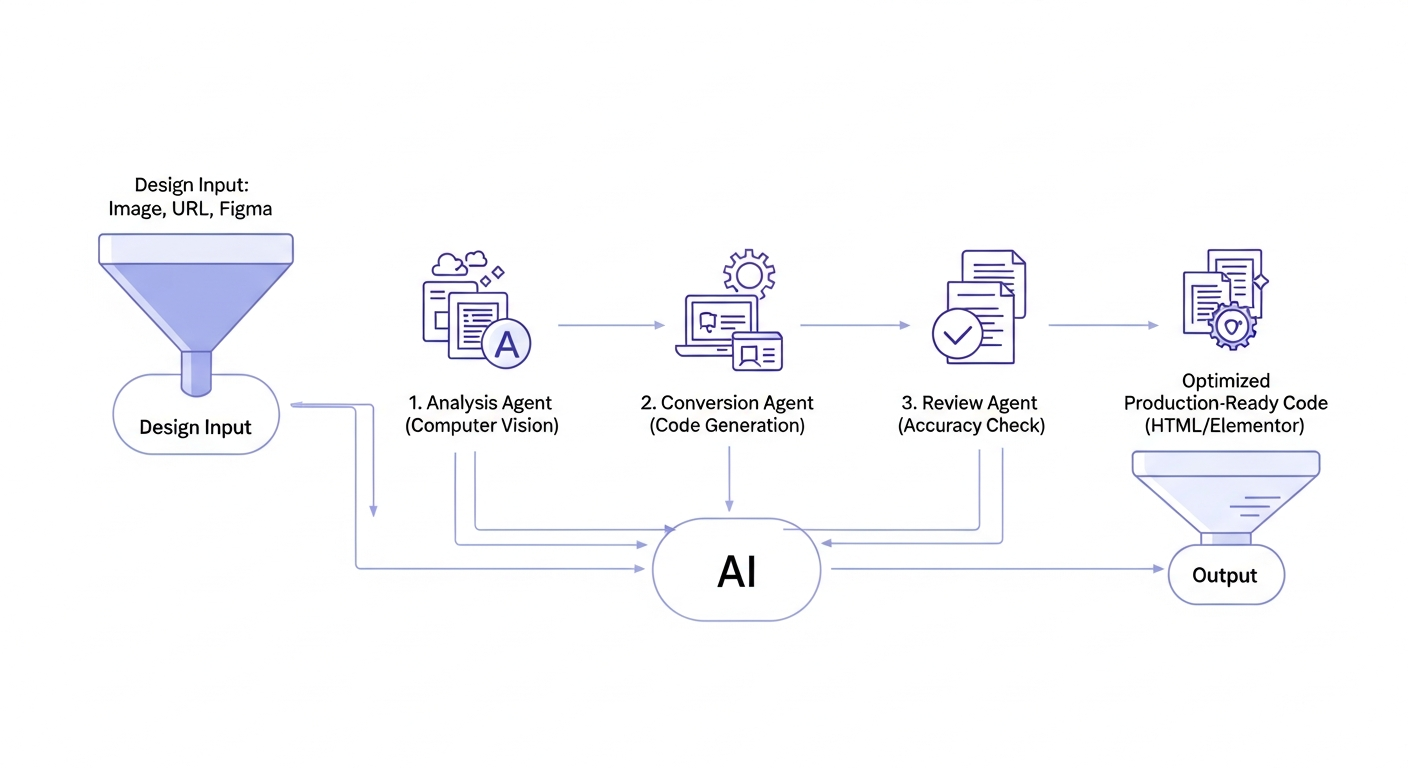
Unlike monolithic AI models, DesignToCodeAI employs a network of specialized AI agents, each tasked with a specific part of the conversion pipeline. This collaborative approach, leveraging advanced computer vision for layout detection, natural language processing to understand user refinements, and sophisticated generative AI models for code synthesis, significantly enhances accuracy and efficiency:
- Analysis Agent: Scans the input design (image, URL, Figma) to identify elements like layout structure, typography, color palettes, and component types. It utilizes computer vision in web design to accurately interpret visual data.
- Conversion Agent: Translates the identified design elements into raw code segments, focusing on semantic HTML, modern CSS (like Tailwind), and appropriate JavaScript interactions. This generative AI for code ensures functional output.
- Review Agent: Cross-references the generated code against the original design to detect discrepancies, ensuring pixel-perfect accuracy and responsiveness across various screen sizes.
- Optimization Agent: Refines the code for performance, SEO-friendliness, and clean structure, making it production-ready.
This multi-agent collaboration significantly reduces the need for manual adjustments, delivering a higher fidelity output from the first pass.
The Evolution of AI in Design-to-Code Workflows
The integration of AI into design-to-code workflows has evolved significantly. Early attempts often produced rudimentary, non-responsive code. However, current best practices, as implemented by DesignToCodeAI, leverage advanced computer vision, natural language processing (for understanding instructions), and sophisticated code generation models. This evolution has led to outputs that are not only visually accurate but also structurally sound, accessible, and performant, marking a new era for front-end development and setting DesignToCodeAI apart from basic design to code alternatives.
Key Features: Convert Any Design into Production-Ready Code
DesignToCodeAI offers a robust set of features designed to cater to a wide range of web development needs, from simple image conversions to complex website redesigns, making it one of the most efficient web development tools available today.
Pixel-Perfect HTML with Optimized Tailwind CSS and JavaScript
DesignToCodeAI generates clean, semantic HTML code that precisely matches your original design. This output comes with optimized Tailwind CSS for utility-first styling and essential JavaScript, ensuring both functionality and a modern development stack. The generated code inherently includes responsive layouts, adapting seamlessly to desktops, tablets, and mobile devices, and boasts an SEO-friendly structure to enhance search engine visibility. This feature delivers pixel-perfect HTML from design, a key benefit for designers and developers alike.
Seamless Elementor Template Generation for WordPress
For WordPress users, DesignToCodeAI provides a unique advantage: the ability to generate a single JSON file specifically formatted as an Elementor Template. This file is ready for direct import into Elementor via its Template Import option. This feature preserves all styling, layout, and widget mapping, allowing for seamless integration into your WordPress projects and dramatically speeding up the development process within the Elementor ecosystem, making it an ideal Elementor template generator.
Transforming Websites: The Power of URL-Based Redesign
Beyond static images, DesignToCodeAI allows users to input a website URL. The AI then analyzes the source website for inspiration or to initiate a complete, modern redesign. This is particularly powerful for businesses looking to refresh their online presence without starting from scratch. The AI intelligently extracts content and structure, generating a fresh, professional layout that aligns with contemporary design trends, effectively offering an AI website redesign solution.
From Concept to Code: DesignToCodeAI’s 3-Step Workflow Explained
Experiencing the power of DesignToCodeAI is straightforward, guided by a simple yet effective three-step process designed for maximum efficiency in design asset conversion.
Step 1: Effortless Design Upload or URL Input
The journey begins by providing your design input. Users can easily drag and drop a design image (PNG, JPG, up to 20MB), paste a Figma link, or enter a website URL. Following this, you select your desired output format—either HTML with Tailwind CSS or an Elementor Template JSON. You can also customize preferences, such as the number of AI iterations, to guide the conversion process. This initial step makes Figma to HTML AI conversion, image to code AI, and screenshot to HTML conversion incredibly accessible.
Step 2: Intelligent AI Conversion and Iteration
Once the input is provided, DesignToCodeAI’s multi-agent AI system springs into action. It meticulously analyzes the layout, typography, and components of your design. The system then generates either pixel-perfect HTML or the Elementor Template JSON. For those seeking a fresh aesthetic, the “Redesign” option can be selected for a completely modern overhaul, allowing the AI to reinterpret the input with contemporary design principles.
Step 3: Refine, Review, and Export Production-Ready Assets
The final step involves reviewing the generated code. DesignToCodeAI offers options to make refinements using additional AI iterations or through a chat interface, allowing for precise adjustments. Once satisfied, you can export the clean, production-ready HTML or Elementor Template JSON, ready for deployment on your website or within WordPress. This iterative refinement process ensures that the final output perfectly aligns with your vision.
Expert Insight: A common mistake businesses make is underestimating the hidden costs and time sinks of manual design-to-code translation. Leveraging tools like DesignToCodeAI for rapid prototyping and initial code generation can free up senior developers for more complex, high-value tasks, significantly boosting project ROI and front-end development acceleration.
Who Benefits Most from DesignToCodeAI’s AI-Powered Conversion?
DesignToCodeAI is a versatile tool that caters to a broad spectrum of professionals in the web development ecosystem, each finding unique advantages in its AI-powered capabilities.
Freelance Designers: Accelerating Project Delivery
Freelance lead designers often juggle multiple projects with tight deadlines. DesignToCodeAI allows them to convert their Figma, Adobe XD, or Sketch designs into functional code rapidly, reducing their development time and enabling them to take on more clients or deliver projects faster. Sarah Johnson, a freelance lead designer, notes that the service has significantly reduced her development time, praising the AI’s understanding of various design systems.
WordPress Developers: Streamlining Elementor Workflows
For WordPress developers, particularly those who rely on Elementor, DesignToCodeAI is a game-changer. The ability to export designs directly into Elementor Template JSON files streamlines their workflow, eliminating the need to manually recreate designs within the builder. Michael Chen, a WordPress Developer, highlights that he can take a Figma design and have it live on a WordPress site in under 10 minutes, thanks to the flawless JSON export.
Startups and Product Managers: Rapid Prototyping and Iteration
Startups thrive on speed and iteration. Product managers and development teams can use DesignToCodeAI for rapid prototyping, quickly generating functional prototypes from design concepts. This accelerates the feedback loop, allowing for faster iterations and a quicker path to market. Emma Rodriguez, a Product Manager, attests to the amazingly accurate conversions, which have significantly boosted her team’s iteration speed.
Creative Agencies: Boosting Efficiency and Scalability
Creative agencies handling numerous client projects can leverage DesignToCodeAI to enhance their efficiency and scalability. By automating the design-to-code process, agencies can allocate their human resources to more complex creative problem-solving and client management, leading to higher output and improved profitability. It’s a powerful tool for AI for creative teams.
Ensuring Quality: Responsive, SEO-Friendly, and Clean Code
In modern web development, the quality of the underlying code is as crucial as the visual design. DesignToCodeAI prioritizes generating high-quality code that meets industry standards, contributing to robust and performant websites.
The Importance of Semantic HTML and Modern CSS
DesignToCodeAI produces semantic HTML, which uses tags like <header>, <nav>, <article>, and <footer> to convey meaning to both browsers and search engines. This structural clarity is vital for accessibility and maintainability. Coupled with modern CSS practices, including responsive layouts achieved through flexbox and grid, the generated code ensures a robust and adaptable foundation for any website. This commitment to semantic HTML generation ensures better long-term performance.
Building for Performance and Search Engine Visibility
A key aspect of DesignToCodeAI’s output is its inherent SEO-friendly structure. By generating clean, semantic HTML, it provides search engines with a clear understanding of your content hierarchy, which can significantly improve organic search rankings. Moreover, the optimized code contributes to faster page load times, a critical factor for both user experience and SEO performance in June 2026. The result is truly SEO-friendly code.
Tips for Optimizing AI-Generated Code
While DesignToCodeAI delivers production-ready code, a few best practices can further enhance its utility:
- Review and Refine: Always perform a human review to catch any nuanced design elements or specific branding requirements the AI might have missed.
- Utilize Iterations: Leverage the AI’s iteration feature to fine-tune the output, guiding it with additional instructions for complex layouts.
- Modular Development: For multi-section designs, consider converting each major section separately, especially for Elementor Templates. This results in cleaner widget mapping and greater flexibility during editing.
Flexible Pricing and Unwavering Data Privacy with DesignToCodeAI
DesignToCodeAI is built on a user-centric philosophy, offering a transparent pricing model and a robust commitment to user data privacy.
Understanding the Points-Based System for Cost-Effective Conversions
DesignToCodeAI operates on a flexible, transparent points-based system, ensuring users only pay for what they use, with no hidden subscriptions. New users receive 500 free points upon signup to try the service. Each generation consumes points, typically ranging from 300 to 500 points depending on the number of iterations selected. This model allows users to purchase Power Packs tailored to their usage needs, from Starter to Agency tiers, providing a cost-effective solution for varying project volumes. For detailed information, explore the pricing page.
Your Data, Your Control: A Commitment to Privacy and Security
In an era of increasing data concerns, DesignToCodeAI takes a strong stance on user privacy. According to their policy, neither your uploaded designs nor the generated code are stored on their servers. Your data is processed temporarily during your session, ensuring that sensitive design assets remain confidential and secure. Users are responsible for saving any code they wish to keep before exiting the session. This zero-retention policy provides peace of mind for creative teams and businesses handling proprietary designs.
Frequently Asked Questions (FAQs) About DesignToCodeAI
Here are answers to some common questions about DesignToCodeAI, reflecting real user queries and conversational phrasing.
What types of designs can I convert with DesignToCodeAI?
You can upload design images or screenshots in PNG or JPG format, up to 20MB in size. This includes designs exported from tools like Figma, Adobe XD, or Sketch. Additionally, you can provide a website URL for conversion or redesign.
How accurate is the AI code conversion?
DesignToCodeAI uses a multi-agent AI system designed for pixel-perfect accuracy in analyzing layouts, styling, fonts, and components. While most outputs are production-ready, complex designs might require minor adjustments. Utilizing AI iterations and additional instructions can help refine results.
What output formats do you provide?
DesignToCodeAI provides two primary output formats: a single HTML file with integrated Tailwind CSS and JavaScript, or an Elementor Template JSON file, which can be directly imported into Elementor for WordPress sites. Both formats are available for immediate copying and downloading.
Is the generated code responsive and SEO-friendly?
Yes, absolutely. The AI is engineered to produce responsive layouts using modern CSS techniques (flexbox/grid) and semantic HTML. This structured approach not only ensures optimal viewing across devices but also enhances SEO by providing search engines with a clear, organized content structure.
How does the point system work, and how many conversions can I make?
DesignToCodeAI uses a points-based system where each generation consumes points, typically 300 to 500, depending on the number of iterations chosen. The number of conversions you can make depends on your purchased Power Pack and current point balance. New users receive 500 free points to get started. More details are available on the Pricing page.
What if I’m not satisfied with the generated code?
We recommend using Iterations and Additional Instructions to guide the AI toward better output. While we can’t refund points for subjective dissatisfaction, if there’s a clear technical issue, contact support — we’ll investigate and ensure a fair resolution.
What is your refund policy for Point Packs?
Point Packs are non-refundable once any points have been used. If unused, you may request a refund within 7 days of purchase. Contact support with your order details to check eligibility.
If a generation fails, are the points used refunded automatically?
Yes, if a failure is due to a technical error on our side, points are usually refunded automatically. If that doesn’t happen, contact support with the issue details and we’ll resolve it promptly.
Is my uploaded design and generated code stored?
No. Neither your uploads nor generated code are stored on our servers. Your data is processed temporarily during your session. Be sure to save any code you want to keep before exiting.
How do I convert multi-section designs to Elementor Template JSON?
For best results, convert each major section of your design separately. This improves AI accuracy and results in cleaner widget mapping. It also gives you more flexibility when editing inside Elementor, avoiding the complexity of a single long JSON file.
Conclusion: Empowering the Future of Web Creation with AI
DesignToCodeAI stands at the forefront of AI-powered web development, offering a powerful solution that dramatically reduces the time and effort traditionally associated with converting designs into code. Its multi-agent AI system ensures pixel-perfect accuracy, while its support for HTML with Tailwind CSS and Elementor Templates caters to a broad audience of designers and developers.
The Impact of DesignToCodeAI on the Digital Landscape
As of June 2026, DesignToCodeAI is not just a tool; it’s a catalyst for innovation. It empowers freelance designers to take on more projects, enables WordPress developers to accelerate their Elementor workflows, and provides startups with the agility needed for rapid prototyping. By automating the mundane, DesignToCodeAI allows creative minds to focus on what truly matters: crafting exceptional user experiences and pushing the boundaries of digital creation.
Start Your AI-Powered Design Conversion Journey Today
Ready to transform your workflow and unleash unprecedented productivity? Start your AI-powered design conversion journey with DesignToCodeAI today! Get 500 free points upon signup to experience the future of web development firsthand.