
Selling digital products effectively requires a robust, secure, and user-friendly platform. For WordPress users leveraging Paddle Billing V2, CheckoutPress offers a purpose-built solution designed to streamline sales, automate delivery, and fortify digital asset security. This in-depth guide explores how CheckoutPress transforms your WordPress site into a powerful digital sales engine, handling everything from secure transactions to protected file distribution for products like eBooks, software licenses, online courses, and digital templates.
Table of Contents
- Introduction: Streamlining Digital Sales with CheckoutPress and Paddle Billing V2
- What is CheckoutPress? Your Dedicated Paddle Billing V2 Partner for WordPress
- Unpacking Key Features: Why CheckoutPress Stands Out for Digital Creators
- Getting Started: A Step-by-Step Implementation Guide for CheckoutPress
- 1. Plugin Licensing & Activation: Unlocking Secure Communication
- 2. Configuring Paddle API Credentials: Linking Your Store to Paddle
- 3. Mapping Digital Products to Paddle Price IDs: Secure Upload & Storage
- 4. Implementing Checkout Shortcodes: Building Your Sales Pages
- 5. Setting Up Paddle Webhooks: Automating Delivery and Updates
- Advanced Capabilities: Enhancing Your E-commerce Ecosystem
- Support, Licensing, and Future-Proofing Your Digital Business
- Conclusion: Empowering Your Digital Sales Journey with CheckoutPress
Introduction: Streamlining Digital Sales with CheckoutPress and Paddle Billing V2
The digital economy thrives on the secure and efficient distribution of digital goods, yet many creators face significant hurdles in managing sales, ensuring secure delivery, and providing a seamless customer experience. These challenges are particularly pronounced for those selling high-value digital products such as software licenses, premium eBooks, or exclusive online course materials.
The Challenge of Selling Digital Products Securely
Traditional payment plugins often fall short, storing digital assets in publicly accessible folders or relying on complex, costly SaaS wrappers. This common pitfall exposes valuable intellectual property to unauthorized access, complicates compliance, and often leads to increased operational overhead. The market demands a solution that combines robust security with intuitive operation, particularly for WordPress users seeking a dedicated Paddle Billing V2 integration.
How CheckoutPress Transforms Your WordPress E-commerce
CheckoutPress is a professional, secure payment solution for WordPress that directly addresses these critical needs. It is engineered specifically for Paddle Billing V2, streamlining the entire sales process from a secure checkout to protected file delivery. Unlike generic plugins, CheckoutPress keeps all digital assets local and encapsulated within a zero-trust environment, ensuring that only verified purchasers gain access, thereby safeguarding your revenue and intellectual property.
What is CheckoutPress? Your Dedicated Paddle Billing V2 Partner for WordPress
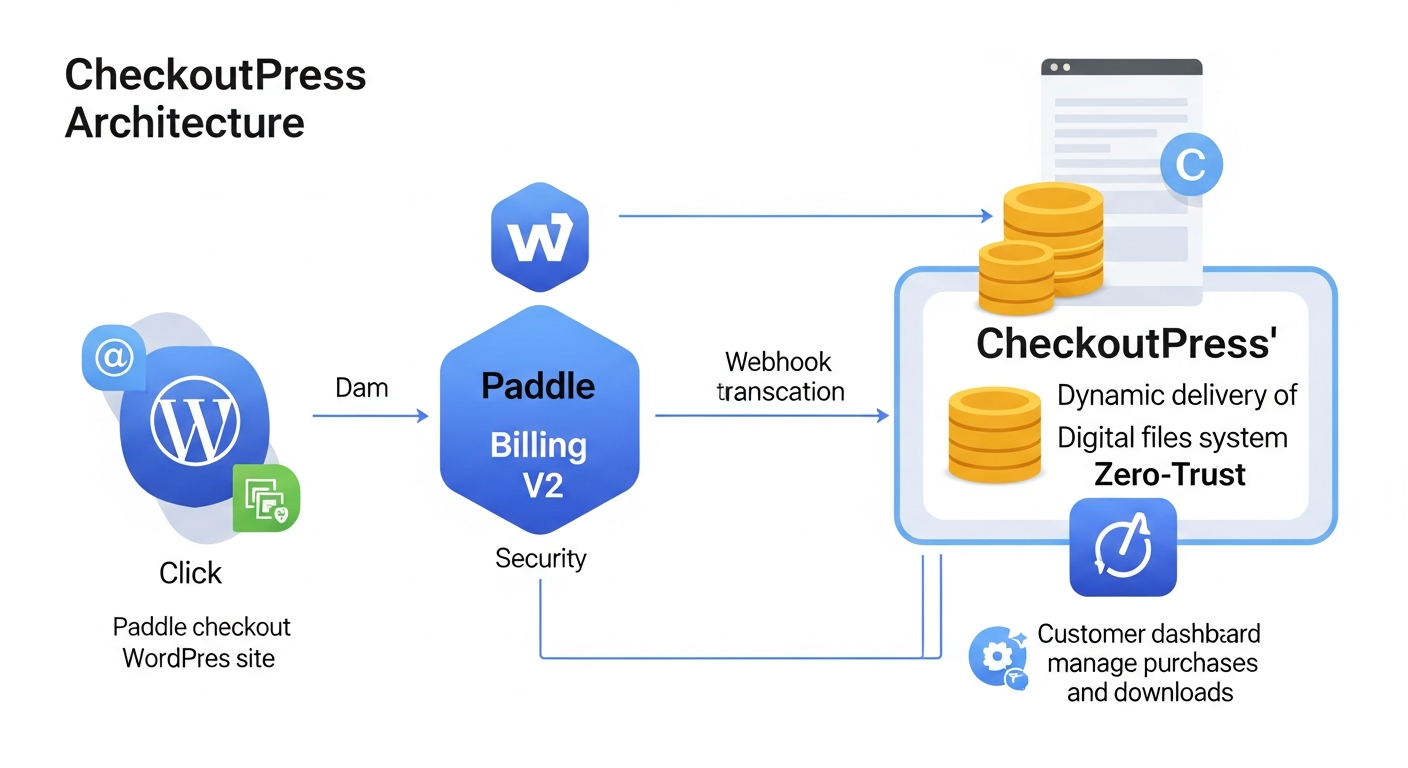
CheckoutPress is a specialized WordPress plugin engineered to facilitate the secure and efficient sale of various digital products, including software, eBooks, templates, and online course content, through Paddle Billing V2. It acts as a robust bridge, integrating Paddle’s powerful global payment infrastructure directly into your WordPress site, offering a secure, efficient, and automated sales engine.
Designed Exclusively for Paddle Billing V2
Unlike many multi-purpose payment plugins, CheckoutPress is built from the ground up to fully leverage Paddle Billing V2. This optimization includes native support for modern Client-Side Tokens, which power secure checkout overlays, and robust Webhook signatures for authenticating payment notifications. This dedicated design ensures maximum compatibility, security, and access to Paddle’s latest features without the overhead of supporting legacy systems.
Core Functionalities: Transaction Management, Account Creation, & File Delivery
The plugin’s core value lies in its comprehensive automation and security. CheckoutPress handles automated transaction logging, providing precise records for every sale. It also facilitates automated customer account creation, simplifying post-purchase management. Crucially, it manages protected file delivery, serving digital assets only after a verified successful payment, eliminating manual intervention and significantly enhancing security for products like software licenses or premium content.
The Power of the Paddle Overlay Checkout, Secured by CheckoutPress
CheckoutPress seamlessly integrates with the familiar and conversion-optimized Paddle Overlay Checkout. This means your customers experience a smooth, localized, and globally compliant checkout process powered by Paddle, while CheckoutPress operates discreetly in the background. It ensures that your digital assets, stored in a non-public, high-security directory, are accessible only when a verified successful payment has occurred, combining a superior user experience with unparalleled security.
Unpacking Key Features: Why CheckoutPress Stands Out for Digital Creators
CheckoutPress offers a comprehensive suite of features specifically designed to provide a secure and streamlined digital sales experience. These functionalities collectively contribute to its robust performance and user-friendly interface, making it an ideal choice for creators selling everything from digital art to complex software.
Seamless Paddle Billing V2 Integration: API & Client-Side Mastery
In modern e-commerce, effortless integration and robust security are paramount. CheckoutPress excels by offering native integration with Paddle Billing V2. This means it fully supports Paddle’s Client-Side Tokens for frontend checkout interactions and utilizes the API Key for secure server-side order verification. This dual approach ensures both a smooth customer experience and robust backend data integrity, crucial for any digital product, from a simple eBook to a complex SaaS subscription.
Expert Insight: Experienced developers often emphasize that the security of API credentials is as vital as the payment gateway itself. CheckoutPress’s dedicated settings ensure your Paddle API credentials are stored securely within your WordPress environment, minimizing exposure risks.
Robust Digital Asset Security & Storage: The ‘Zero-Trust’ Approach
CheckoutPress employs a ‘Zero-Trust’ approach to file storage, a critical differentiator from many conventional digital download solutions. Digital files are stored in a custom protected directory (checkoutpress-protected) within your WordPress uploads folder. Direct browser access to these files is explicitly blocked through server-level rules, meaning files are only served via secure PHP streams after a verified purchase. This method ensures that even if someone discovers the direct URL to your digital product, they cannot access it without a legitimate transaction record, providing superior protection for high-value assets like premium software or exclusive content.
Professional Transaction & Order Tracking Dashboard
Monitoring sales and customer activity is made intuitive with CheckoutPress. The plugin includes a high-fidelity admin interface designed for real-time transaction monitoring. This dashboard provides contextual summaries for your “Thank You” pages, displaying real-time transaction data and giving you a clear overview of your sales performance without ever leaving your WordPress environment. This centralized view is invaluable for tracking sales of diverse digital products, from single-purchase templates to recurring software licenses.
Effortless Checkout Flows with Semantic Shortcodes
Building your sales pages and integrating the checkout process is simplified through CheckoutPress’s clean, semantic shortcodes. These shortcodes allow you to embed critical components anywhere on your WordPress site without needing to write custom code. For instance, the `(paddle_checkout price_id="pri_..." text="Buy Now")` shortcode renders a high-conversion checkout button, while (paddle_order_summary) displays transaction details post-purchase, ensuring a seamless user journey for any digital product sale.
Dedicated Customer Dashboard for Downloads and Purchase History
Post-purchase, customers benefit from a responsive portal where they can manage their account and access instant downloads. The `(paddle_dashboard)` shortcode renders this secure customer download area, listing all successful transactions and generating secure, authenticated download links that prevent hotlinking. This self-service portal not only enhances customer satisfaction but also significantly reduces support inquiries related to download access for all types of digital goods.
Getting Started: A Step-by-Step Implementation Guide for CheckoutPress
Implementing CheckoutPress is a straightforward process, designed to integrate seamlessly with your existing WordPress setup. Follow these steps to begin selling your digital products securely and efficiently.
1. Plugin Licensing & Activation: Unlocking Secure Communication
To unlock CheckoutPress’s full capabilities and enable secure communication with the Paddle API, you must activate your plugin license. Within the CheckoutPress settings, navigate to the License tab and enter your unique License Key. This crucial authentication step activates secure server-to-server communication and enables automatic webhook verification, vital for processing sales of digital products like software and subscriptions. Without a successfully activated license, API credentials will not be validated against Paddle servers.
2. Configuring Paddle API Credentials: Linking Your Store to Paddle
The next vital step involves configuring your API credentials to establish a secure link between your WordPress store and your Paddle account. CheckoutPress v1.5.0 is fully optimized for Paddle Billing (V2), requiring specific credentials:
- Client-Side Token: Essential for the JavaScript checkout overlay, enabling the Paddle checkout experience on your site.
- API Key: Required for secure server-side order verification and data retrieval, ensuring backend processes for transaction logging are robust.
- Webhook Secret: Critical for verifying the authenticity of Paddle payment notifications, protecting against fraudulent webhook calls and ensuring reliable digital product delivery.
These credentials are configured within the Paddle Engine Configuration section of CheckoutPress, allowing you to easily switch between Sandbox and Production environments for thorough testing and live sales.
3. Mapping Digital Products to Paddle Price IDs: Secure Upload & Storage
Within the Products tab of CheckoutPress, you can link your Paddle Price IDs to your physical digital files with a one-click mapping process:
- Price ID Linkage: Enter the
pri_...ID directly from your Paddle dashboard, associating it with your specific digital product. - Secure Upload: Use the native uploader to move your digital files into the designated
checkoutpress-protectedfolder. This action automatically applies zero-trust security measures. - Storage Status: A real-time indicator shows whether your file is securely stored or if it’s publicly accessible, ensuring you maintain optimal security for all your digital assets.
This process ensures that each Paddle product is correctly associated with its corresponding secure digital asset, ready for protected delivery post-purchase.
4. Implementing Checkout Shortcodes: Building Your Sales Pages
CheckoutPress provides a set of clean, semantic shortcodes to effortlessly construct your checkout flow and customer areas:
`(paddle_checkout price_id="pri_..." text="Buy Now")`: Use this to render a high-conversion checkout button anywhere on your site, initiating the Paddle Overlay Checkout for your digital products.`(paddle_order_summary)`: Place this on your “Thank You” or order confirmation pages to display a success message and real-time transaction details to your customer, enhancing transparency.`(paddle_dashboard)`: Embed this on a dedicated customer page to create a secure download area and display purchase history for logged-in users, centralizing their access to purchased digital goods.
These shortcodes simplify the integration of Paddle’s functionality into your WordPress pages and posts, requiring no custom coding.
5. Setting Up Paddle Webhooks: Automating Delivery and Updates
Automating digital product delivery and transaction updates is achieved through Paddle webhooks, a critical step for a fully functional sales engine:
- Endpoint URL: Copy the unique Webhook Endpoint URL from the CheckoutPress settings sidebar (e.g.,
https://yourdomain.com/wp-json/checkout-press/v1/webhook). - Paddle Configuration: In your Paddle Dashboard, navigate to the Webhooks section and paste this Endpoint URL.
- Event Selection: Crucially, enable the
transaction.paidandtransaction.completedevents in Paddle. These events trigger CheckoutPress to process orders and grant access to digital products automatically. - Webhook Secret: Paste your Webhook Secret (obtained from Paddle) back into CheckoutPress settings to secure the handshake between Paddle and your WordPress site, ensuring the authenticity and integrity of incoming notifications.
| Paddle Credential | Purpose | Location in Paddle | Security Best Practice |
|---|---|---|---|
| Client-Side Token | Enables Paddle JS checkout overlay | Paddle Dashboard > Developer Tools > Authentication | Never expose in public code |
| API Key | Server-side order verification & data retrieval | Paddle Dashboard > Developer Tools > Authentication | Store securely in plugin settings |
| Webhook Secret | Verifies authenticity of Paddle notifications | Paddle Dashboard > Developer Tools > Webhooks | Ensure match in CheckoutPress settings |
Advanced Capabilities: Enhancing Your E-commerce Ecosystem
Beyond its core functionality, CheckoutPress provides advanced features that allow for deeper integration and enhanced security within your digital sales ecosystem, catering to a wider range of business needs.
WooCommerce Sync: Mirroring Paddle Transactions for Comprehensive Reporting
For businesses already leveraging WooCommerce, CheckoutPress offers an optional yet powerful ‘Shadow Order’ feature. If WooCommerce is active on your site, every successful Paddle transaction automatically creates a corresponding “Completed” order in WooCommerce. This seamless synchronization is invaluable for:
- Unified Sales Reporting: Centralizing all sales data within WooCommerce for comprehensive analytics and simplified accounting.
- Price Integrity: Automatically extracting net subtotal and tax totals from Paddle V2 line items, ensuring accurate financial records that align across platforms.
- Transaction ID Mapping: Mapping the Paddle
txn_...ID to the WooCommerce transaction field for easy cross-referencing and reconciliation, especially useful for managing refunds or support queries.
This integration ensures you can leverage WooCommerce’s extensive reporting and inventory management features alongside Paddle’s robust billing, without manual data entry.
Security Deep Dive: HTACCESS Protection, Download Interceptor, and Data Privacy
CheckoutPress’s commitment to security is deeply embedded in its architectural design, employing multiple layers of protection:
- HTACCESS Protection: The plugin automatically injects server-level rules into your uploads directory, specifically blocking direct browser access to the protected digital files. This is a fundamental defense against hotlinking and unauthorized downloads.
- Download Interceptor: Digital files are served exclusively via secure PHP streams. This means that before any file is delivered, the system dynamically verifies that the user has a completed purchase status in the database. This real-time verification prevents unauthorized downloads even if the file’s server path is discovered, a common vulnerability in less secure systems.
- Slug-based Isolation: Each CheckoutPress installation uses unique database table prefixes based on your plugin slug. This prevents conflicts and enhances security in multi-site or complex WordPress environments.
In terms of data privacy, CheckoutPress adheres to strict principles: transaction logs are stored locally on your server, providing you with full control over your data. Crucially, no customer financial data, such as credit card numbers, ever touches your server, as all sensitive payment processing is handled directly by Paddle, significantly simplifying your PCI compliance efforts. This approach contrasts sharply with solutions that might expose your server to more direct financial data handling.
Optimizing for Performance: Mobile Responsiveness and Clean Code
In modern e-commerce, user experience is directly tied to performance and accessibility. The customer dashboard, powered by CheckoutPress, features a fully responsive table UI built with Dashicons, ensuring it looks and functions perfectly across all devices. The plugin is developed with clean, optimized code, ensuring minimal impact on site performance and making it fully compatible with Nginx, LiteSpeed, and any standard WordPress hosting environment, as the secure delivery logic is handled efficiently at the PHP level.
Support, Licensing, and Future-Proofing Your Digital Business
Choosing a digital sales engine involves considering not just its feature set but also the quality of support and the underlying framework that ensure its longevity and reliability. ShahiSoft, with its proven expertise in AI-driven digital solutions, stands behind CheckoutPress.
Dedicated Support from ShahiSoft
CheckoutPress is developed and maintained by ShahiSoft, a company dedicated to transforming ideas into digital realities with AI. ShahiSoft provides dedicated support for its digital sales tools, understanding the critical nature of e-commerce operations. For technical implementation help, licensing issues, or custom feature requests, users can easily contact the helpdesk, ensuring that expert assistance is readily available when needed. This commitment to support helps businesses navigate any challenges and maximize their investment.
Understanding the GPL v2.0+ License and API Requirements
The plugin is distributed under the GPL v2.0+ license, which ensures flexibility and adherence to open-source principles. It’s important to note that CheckoutPress requires a valid Paddle Seller account with Paddle Billing V2 enabled for full functionality. The plugin does not support the legacy Paddle V1 (Classic) platform, aligning with modern payment processing standards and ensuring compatibility with Paddle’s most advanced features.
Ensuring Data Privacy and Compliance
According to industry best practices, data privacy is a paramount concern for any online business. CheckoutPress adheres to strict privacy principles: transaction logs are stored locally on your server, providing you with full control and transparency over your sales data. Crucially, no customer financial data, such as credit card numbers, ever touches your server, as all sensitive payment information is handled directly and securely by Paddle. This architecture significantly simplifies your PCI compliance efforts and builds trust with your customers.
Conclusion: Empowering Your Digital Sales Journey with CheckoutPress
CheckoutPress offers a comprehensive and secure solution for selling a wide range of digital products on WordPress using Paddle Billing V2. Its zero-trust security model, seamless integration, intuitive product mapping, and robust customer dashboard collectively provide a powerful, conversion-optimized platform. By automating transaction logging, ensuring secure file delivery, and offering valuable integrations like WooCommerce Sync, CheckoutPress empowers digital creators to confidently focus on what they do best: creating exceptional products like software, online courses, eBooks, and digital templates.
Stop paying monthly subscriptions for payment gateways and gain lifetime access to a hardened, zero-trust solution. Experience the ease of a one-click mapping system and instant WordPress synchronization. Ready to transform your digital sales and secure your assets? Discover the full potential of CheckoutPress and its pricing options by visiting https://shahisoft.com/checkoutpress/#pricing or contacting ShahiSoft today for custom setup inquiries.
Frequently Asked Questions
What specific version of Paddle is CheckoutPress optimized for?
CheckoutPress is built specifically for Paddle Billing V2, utilizing modern Client-Side Tokens and secure Webhook signatures. It does not support the legacy V1 (Classic) platform.
How does CheckoutPress prevent unauthorized access to my digital files?
CheckoutPress employs a ‘Zero-Trust’ approach: files are stored in a custom protected directory with server-level rules blocking direct access. Files are only served via secure PHP streams after the system verifies a completed purchase in the database.
Is it mandatory to use WooCommerce with CheckoutPress?
No, WooCommerce integration is optional. However, if WooCommerce is active, CheckoutPress includes a ‘Shadow Order’ feature that automatically creates corresponding ‘Completed’ orders in WooCommerce for unified sales reporting and easier reconciliation.
Which Paddle webhook events are essential for CheckoutPress to function correctly?
For CheckoutPress to automate digital product delivery and updates accurately, you must enable the transaction.paid and transaction.completed events in your Paddle Dashboard’s webhook settings.
Does CheckoutPress store sensitive customer financial information on my server?
No. CheckoutPress stores transaction logs locally but does not store any customer financial data, such as credit card numbers, on your server. All sensitive payment processing is handled directly and securely by Paddle Billing V2.
Can I customize the appearance of the customer download dashboard?
The customer download dashboard is designed with a responsive table UI that utilizes Dashicons, making it compatible with modern WordPress themes. While its core functionality is standard, your active WordPress theme’s styling will naturally influence its overall appearance.